Documenting
the system.
A technical record of the Nód Glas project — documenting the concept, architecture, development environment, implementation, security model, testing process, sustainability considerations and future direction.
From concept to working system.
The documentation is intended to show not only what Node 01 does, but how it was developed and why particular technical decisions were made.
A small system with a clear architecture.
Node 01 has deliberately been implemented using a relatively small number of components. The prototype separates the browser interface, application logic and persistent storage while keeping the overall architecture lightweight.
Built as a practical working prototype.
The original development environment consisted of a Windows 10 computer, Python and a standard web browser. The application was developed as a functional software prototype before being deployed into a hosted environment for demonstration purposes.
| OPERATING SYSTEM | Windows 10 |
|---|---|
| PROGRAMMING LANGUAGE | Python |
| WEB FRAMEWORK | Flask |
| DATABASE | SQLite |
| INTERFACE | HTML / CSS / Web Browser |
| DEMONSTRATION ENVIRONMENT | Namecheap / cPanel Python application environment |
The Namecheap / WordPress environment is used primarily as a public demonstration and presentation layer. The underlying application itself is a Python / Flask system developed independently of WordPress.
Persistent data without unnecessary infrastructure.
Node 01 uses SQLite as its persistent relational database. The database is self-contained within the application environment and stores the information required for the prototype.
TABLE / USERS
TABLE / MESSAGES
Authentication is handled by the application.
Node 01 includes a server-side authentication mechanism. Users must authenticate before they are permitted to submit messages to the community board.
The prototype demonstrates application-level access control rather than relying solely on front-end interface restrictions.
Tested as a working application.
Testing focused on the core functionality required for the Node 01 prototype and confirmed that the principal application workflows operate successfully.
Application Launch
Python / Flask application successfully launched within the demonstration environment.
✓ PASSAuthentication
Valid user credentials successfully authenticated against the application database.
✓ PASSSession Handling
Authenticated sessions remained active while the user interacted with the application.
✓ PASSAccess Control
Posting functionality remained unavailable to unauthenticated users.
✓ PASSMessage Submission
Authenticated users successfully submitted community messages.
✓ PASSPersistence
Submitted messages remained available after page reload through SQLite storage.
✓ PASSSDG Classification
Messages can be associated with defined Sustainable Development Goals.
✓ PASSSearch
Board content can be filtered using keywords and SDG-related information.
✓ PASSLogout
User sessions can be terminated through the application’s logout mechanism.
✓ PASSFrom source code to live demonstration.
The project is supported by practical implementation evidence, including screenshots of the working Node 01 application and its development environment.
Screenshots and supporting evidence form part of the accompanying project submission documentation.
Small footprint. Deliberate architecture.
Sustainability is considered at the architectural level rather than being treated solely as a visual theme.
RESOURCE EFFICIENCY / DESIGN PRINCIPLE
Node 01 has been designed as a lightweight application with a deliberately small software footprint. The prototype does not depend on a large collection of plugins, advertising infrastructure, unnecessary third-party services or a heavyweight application stack.
This approach can reduce storage requirements, software complexity and processing overhead. The architecture is therefore intended to demonstrate how useful community functionality can potentially be delivered with comparatively modest computing resources.
Precise energy savings would require controlled benchmarking against a defined reference platform. The project therefore treats low resource consumption as an architectural objective rather than making unsupported claims about exact energy reductions.
The prototype is a starting point.
Node 01 demonstrates the core concept. Further development could expand the prototype into a more complete distributed community infrastructure platform.
Concept & Research
Define the problem, sustainability objectives and community use case.
Prototype
Develop the initial Python / Flask application and database model.
Functional Node 01
Implement authentication, posting, SDG classification, search and persistent storage.
Security Hardening
Further improve credential handling, validation, session security and deployment configuration.
Multi-Node Research
Investigate communication and information exchange between independent community nodes.
Community Deployment
Explore practical deployment on low-resource hardware for real community environments.
Concept → Code → Node
Nód Glas demonstrates a complete development journey from an initial sustainability and community concept to a functioning software prototype running as a live Node 01 application.
From source code to live demonstration.
Node 01 has been developed as a functioning software prototype rather than a static visual concept. The following evidence demonstrates the application’s authentication boundary, authenticated environment and community posting functionality.
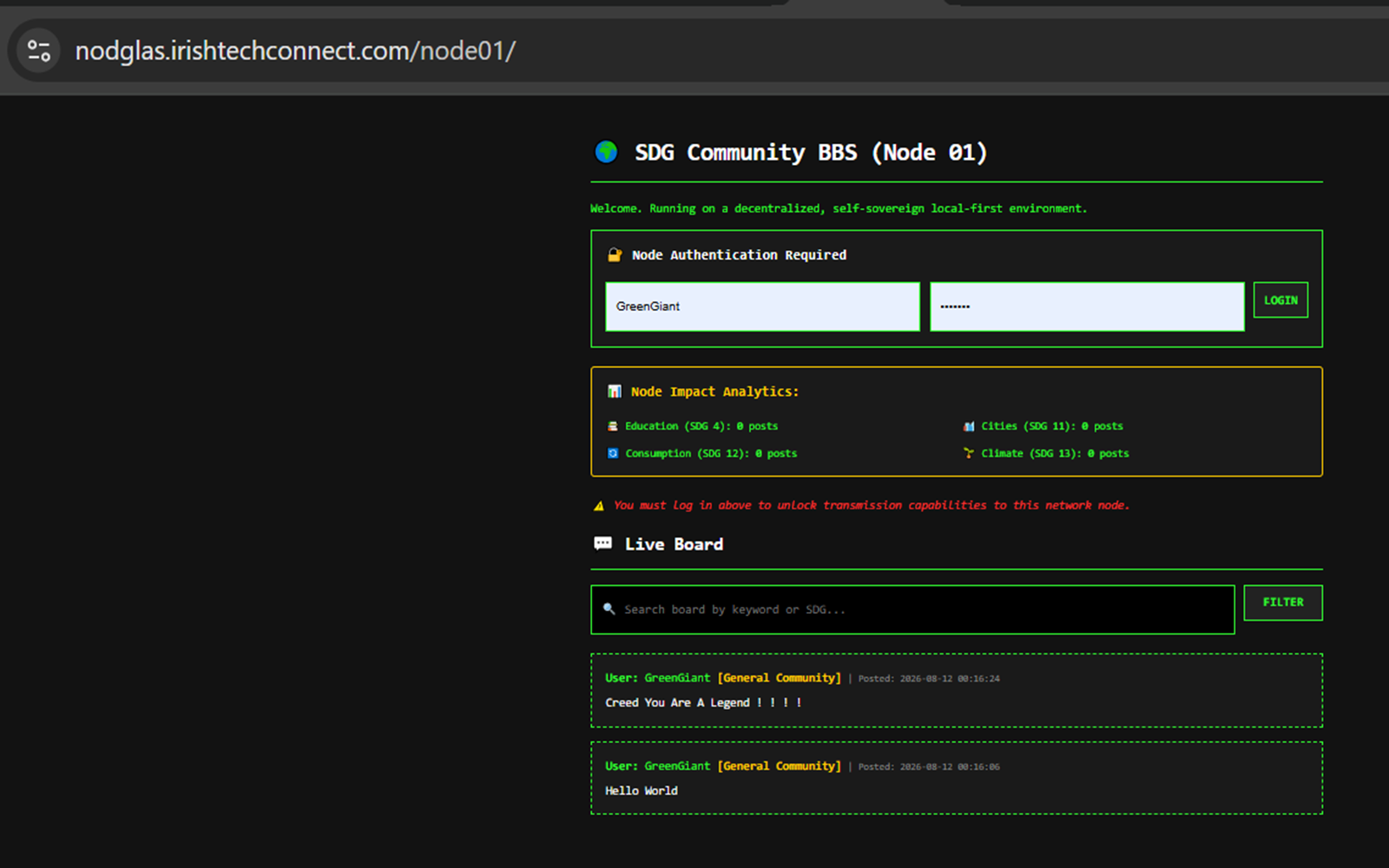
Authentication Boundary
The logged-out state demonstrates that Node 01 presents authentication controls before community posting functionality becomes available. This is evidence of the application’s access boundary; it is not, by itself, a complete security audit.
✓ AUTHENTICATION BOUNDARY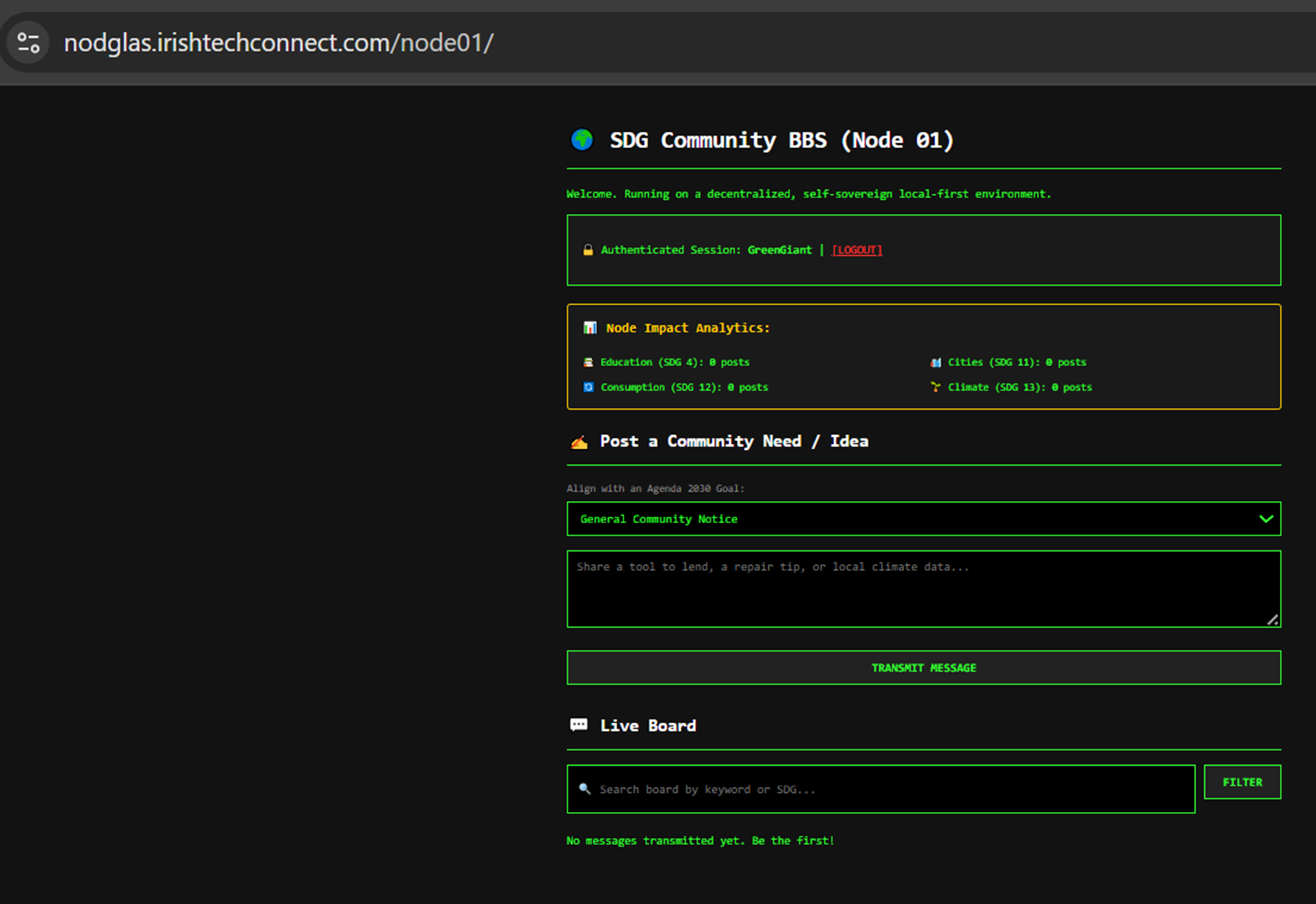
Authenticated Node
The authenticated view demonstrates a successful Flask session and exposes the community posting functionality available to an authenticated Node 01 user.
✓ FLASK SESSION ACTIVE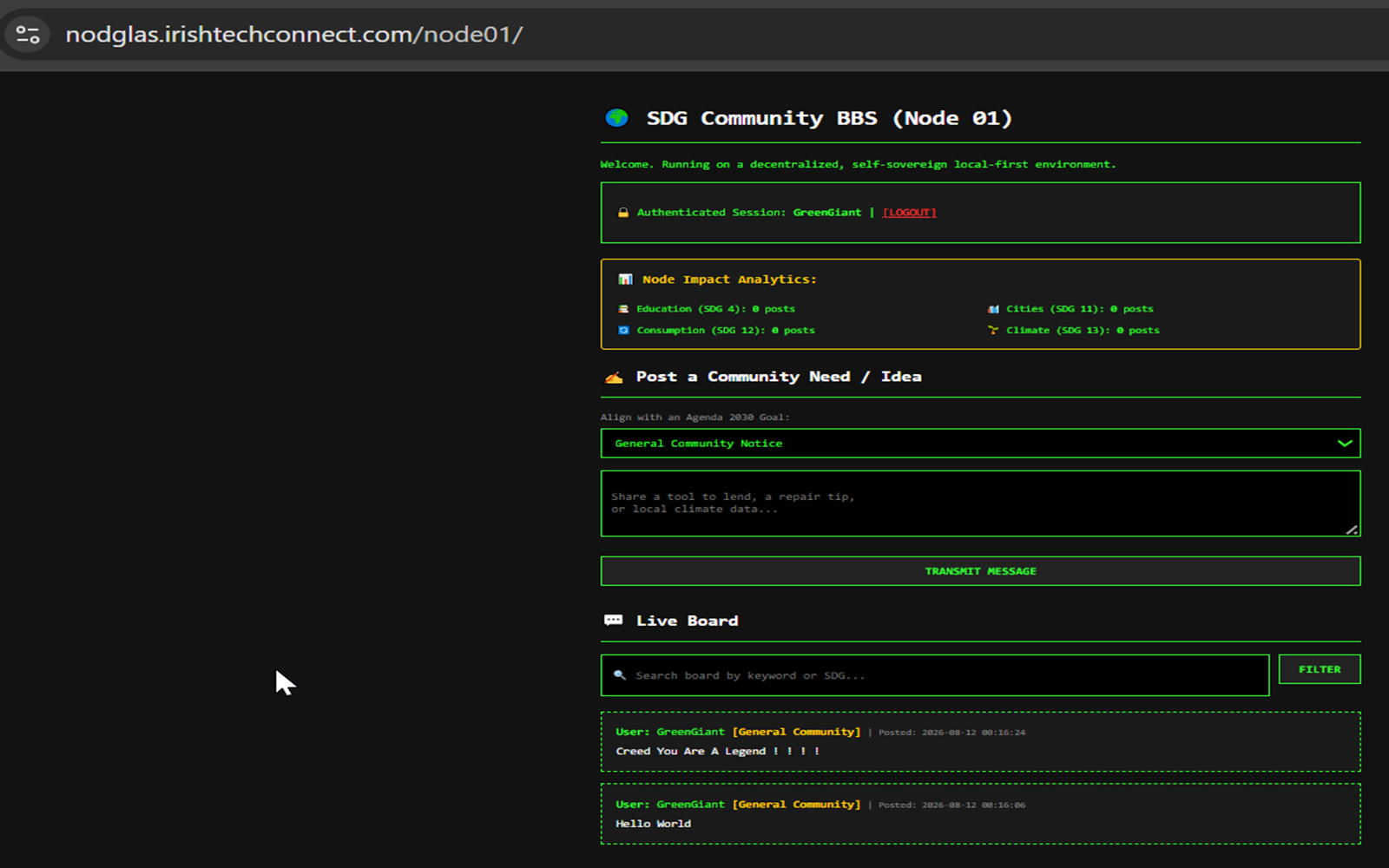
Community Posting
This demonstration shows the working community board with authenticated user-generated content, SDG classification and message display backed by the Node 01 SQLite data layer.
✓ POST / PERSIST / DISPLAY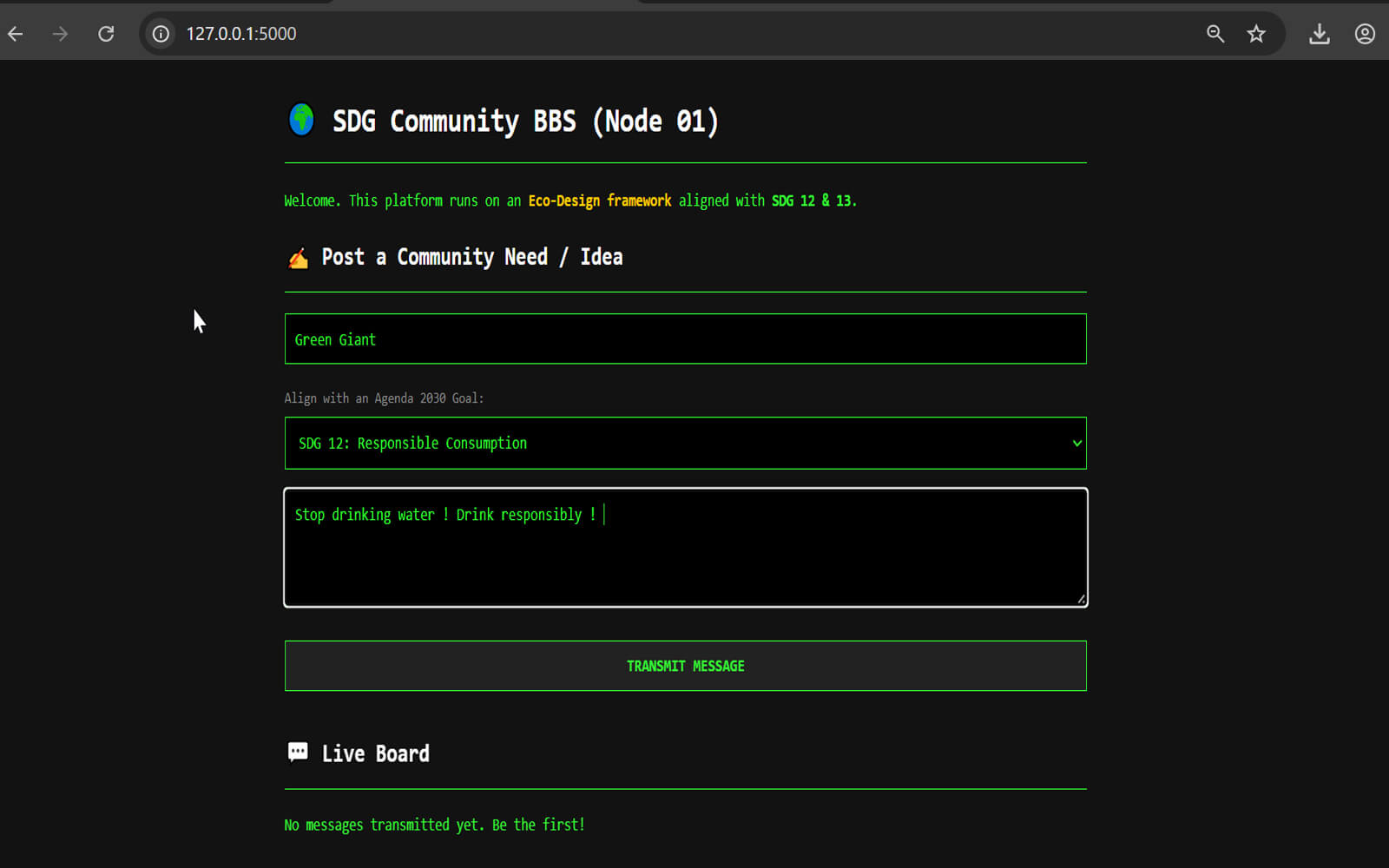
Local Server Prototype
This demonstration records the original local development environment in which Node 01 was developed and tested before being deployed as the public hosted demonstration. It provides visual evidence that the application was developed as a standalone Python/Flask system rather than being created solely as a WordPress presentation.
✓ LOCAL DEVELOPMENT / TEST ENVIRONMENTTogether, these screenshots provide visual evidence of the Node 01 development journey and principal user workflow: local prototype → unauthenticated access → authentication → message submission → SQLite persistence → community-board display. The screenshots complement the source code and live demonstration; they are not presented as a substitute for source-level or security testing.